> For the complete documentation index, see [llms.txt](https://docs.primeautomation.ai/llms.txt). Markdown versions of documentation pages are available by appending `.md` to page URLs; this page is available as [Markdown](https://docs.primeautomation.ai/primeautomation/my-dashboard.md).
# My Dashboard
Welcome to the **Prime Automation** trading bot dashboard — your control center for monitoring bot performance, exchange balances, live trades, and historical PNLs across multiple strategies and accounts.
***
## 📊 Main Dashboard Overview [](#-main-dashboard-overview)
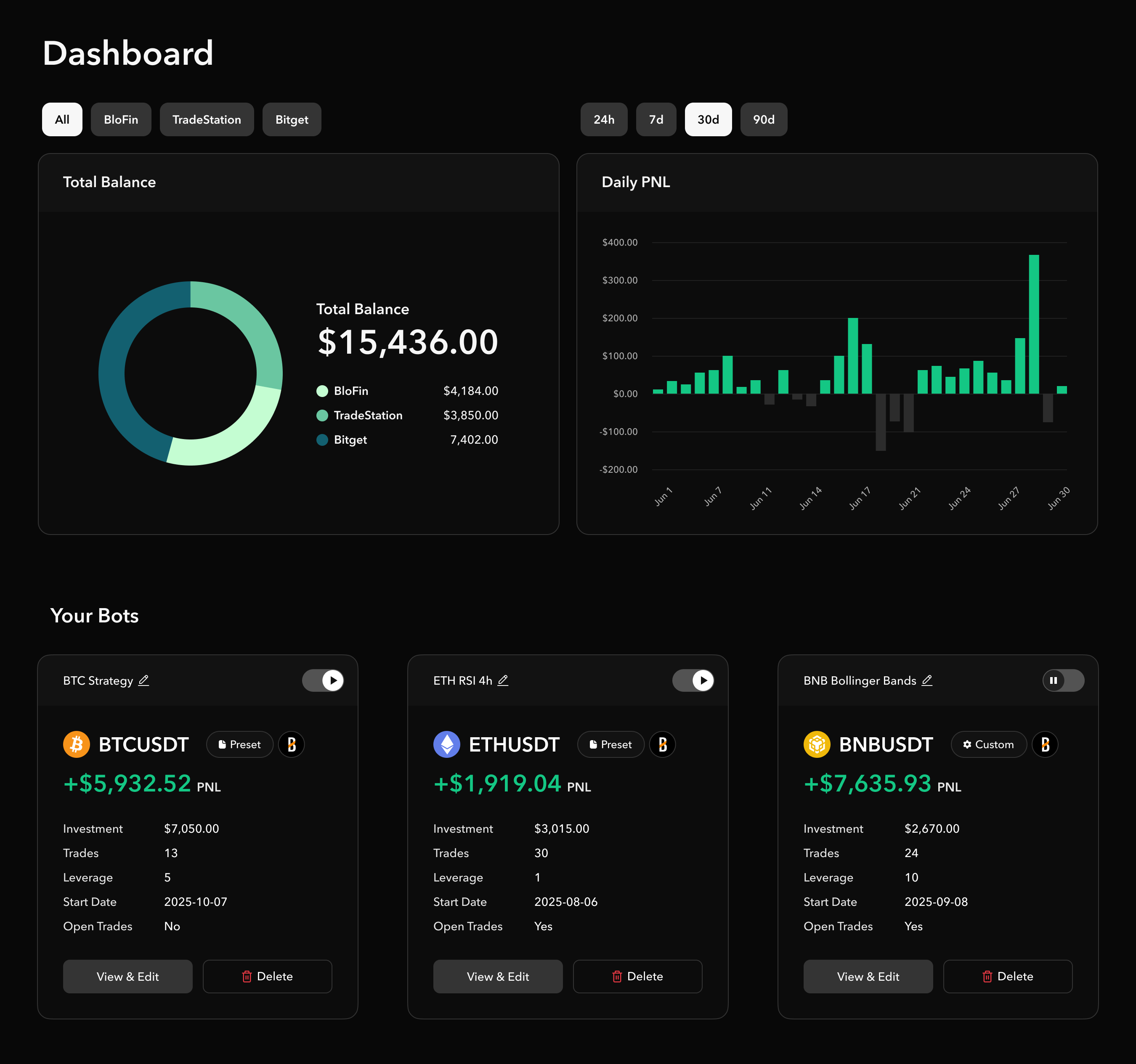
The main dashboard provides a **high-level summary of account balances and performance** across all connected exchanges.
### 🟠 Total Balance (All Exchanges) [](#-total-balance-all-exchanges)
A **circular donut chart** visually represents how your funds are distributed between each exchange:
* **Total Balance**: `$10,000`
* **Breakdown**:
* `TradeStation`: `$5000`
* `Bitget`: `$2000`
* `BloFin`: `$3000`
You can toggle visibility between:
* `All Exchanges`
* `BloFin`
* `TradeStation`
* `Bitget`
### 📅 Daily PNL Chart [](#-daily-pnl-chart)
This interactive bar chart displays your **daily profit and loss** over selected timeframes:
* **Selectable time ranges**: `24h`, `7d`, `30d`, `90d`
* Green bars = Profitable days
* Gray bars = Losses or zero activity
***
{% embed url="" %}
How to navigate your Dashboard
{% endembed %}
## 🤖 Bot Manager Panel [](#-bot-manager-panel)
Each trading bot is displayed in its own **summary card**, showing all key metrics at a glance.
### Bot Card Structure [](#bot-card-structure)
Each bot card includes the following data:
| Field | Description |
| ----------------- | --------------------------------------------------- |
| **Pair** | The trading pair used by the bot (e.g., `BTC/USDT`) |
| **Strategy Type** | Custom or Preset |
| **PNL** | Realized profit or loss |
| **Investment** | Capital allocated to the bot |
| **Trades** | Number of trades executed |
| **Leverage** | Shown if margin was used (e.g., 2x) |
| **Start Date** | When the bot began trading |
| **Account Type** | Live or Simulated |
| **Open Trades** | Whether there are currently active positions |
| **Controls** | Buttons to `View & Edit` or `Delete` the bot |
#### Example Bots [](#example-bots)
* **BTC/USDT (Preset)**: `+$5,932.52` from 13 trades with `5x` leverage
* **ETH/USDT (Preset)**: `+$1,919.04` from 30 trades
* **BNB/USDT (Preset)**: `+$7,635.93` from 24 trades with `10x` leverage
***
## 📂 Active Trades Table [](#-active-trades-table)
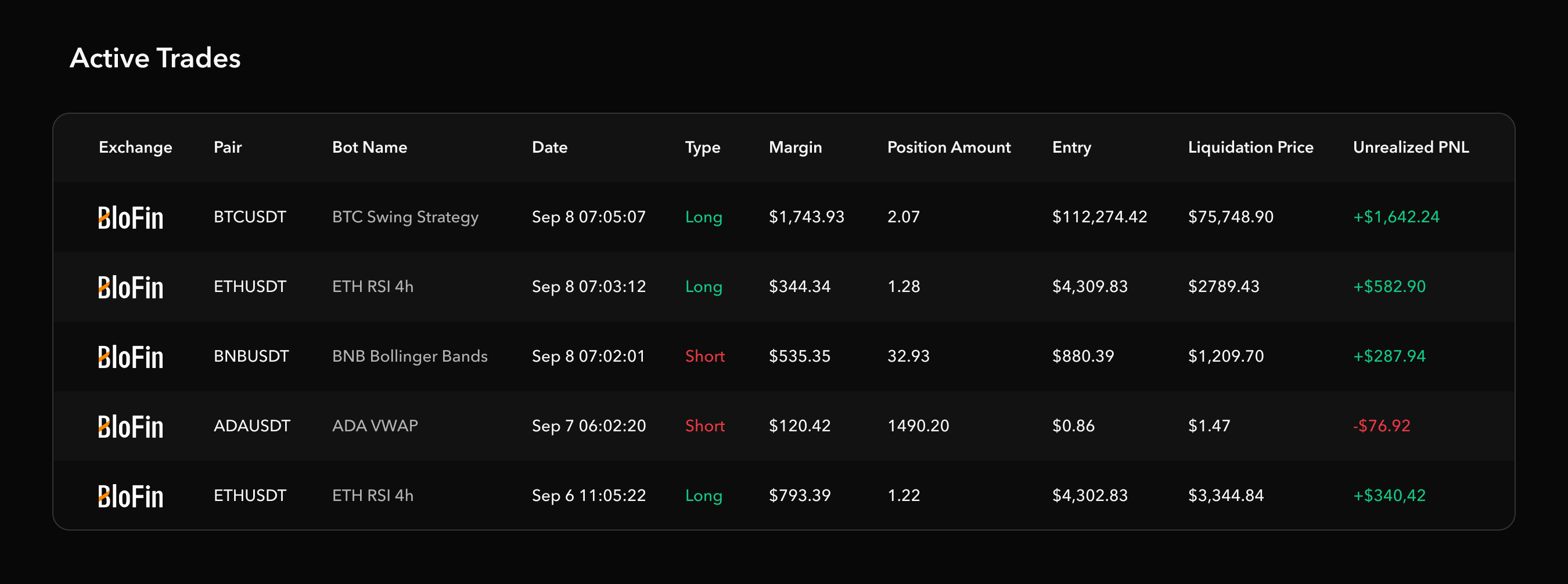
This section displays **all currently open trades** across all bots.
### Table Fields [](#table-fields)
| Column | Description |
| --------------------- | ------------------------------------ |
| **Exchange** | The platform (e.g., `BloFin`) |
| **Pair** | Trading pair (e.g., `BTC/USDT`) |
| **Bot Name** | Name of the bot managing the trade |
| **Date** | Timestamp of trade initiation |
| **Type** | LONG or SHORT |
| **Margin** | Margin allocated in USD |
| **Position Amount** | Size of position (tokens/contracts) |
| **Entry** | Entry price |
| **Liquidation Price** | Liquidation threshold (if leveraged) |
| **Unrealized PNL** | Current PNL not yet realized |
#### Example: [](#example)
| Exchange | Pair | Bot Name | Type | Margin | Entry | PNL |
| -------- | -------- | ------------------ | ----- | --------- | ------------ | ------------ |
| BloFin | BTC/USDT | BTC Swing Strategy | LONG | $1,743.93 | $112,274.424 | `+$1,642.24` |
| BloFin | ETH/USDT | ETH RSI 4h | LONG | $344.34 | $4,309.83 | `+$582.90` |
| BloFin | ADA/USDT | ADA VWAP | SHORT | $120.42 | $0.86 | `-$76.92` |
***
## Closed Trades Table [](#closed-trades-table)
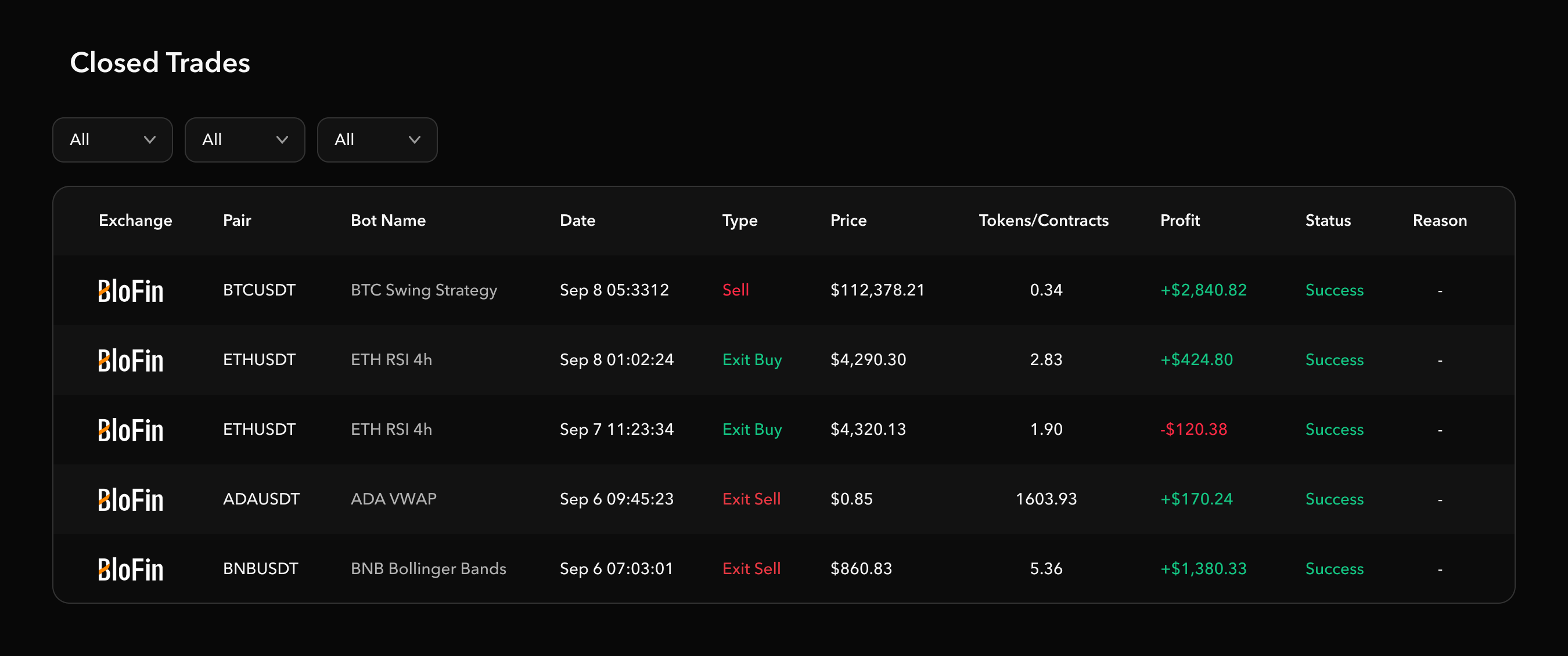
Tracks **historical trade closures**, including failed or successful execution.
### Table Fields [](#table-fields-1)
| Column | Description |
| ------------ | ---------------------------------- |
| **Exchange** | Platform used |
| **Pair** | Trading pair |
| **Bot Name** | Which bot performed the trade |
| **Date** | Execution time |
| **Type** | Sell / Exit Buy |
| **Price** | Execution price |
| **Tokens** | Number of tokens/contracts traded |
| **Profit** | Realized profit |
| **Status** | Success or Failure |
| **Reason** | Failure explanation, if applicable |
#### Example Entries [](#example-entries)
* ✅ **Successful Sell** of `BTC/USDT` at `$112,378.21` for `0.34` tokens
* ❌ **Failed Exit Buy**: "No position found" (likely already closed)
***
## ➕ Create New Bot [](#-create-new-bot)
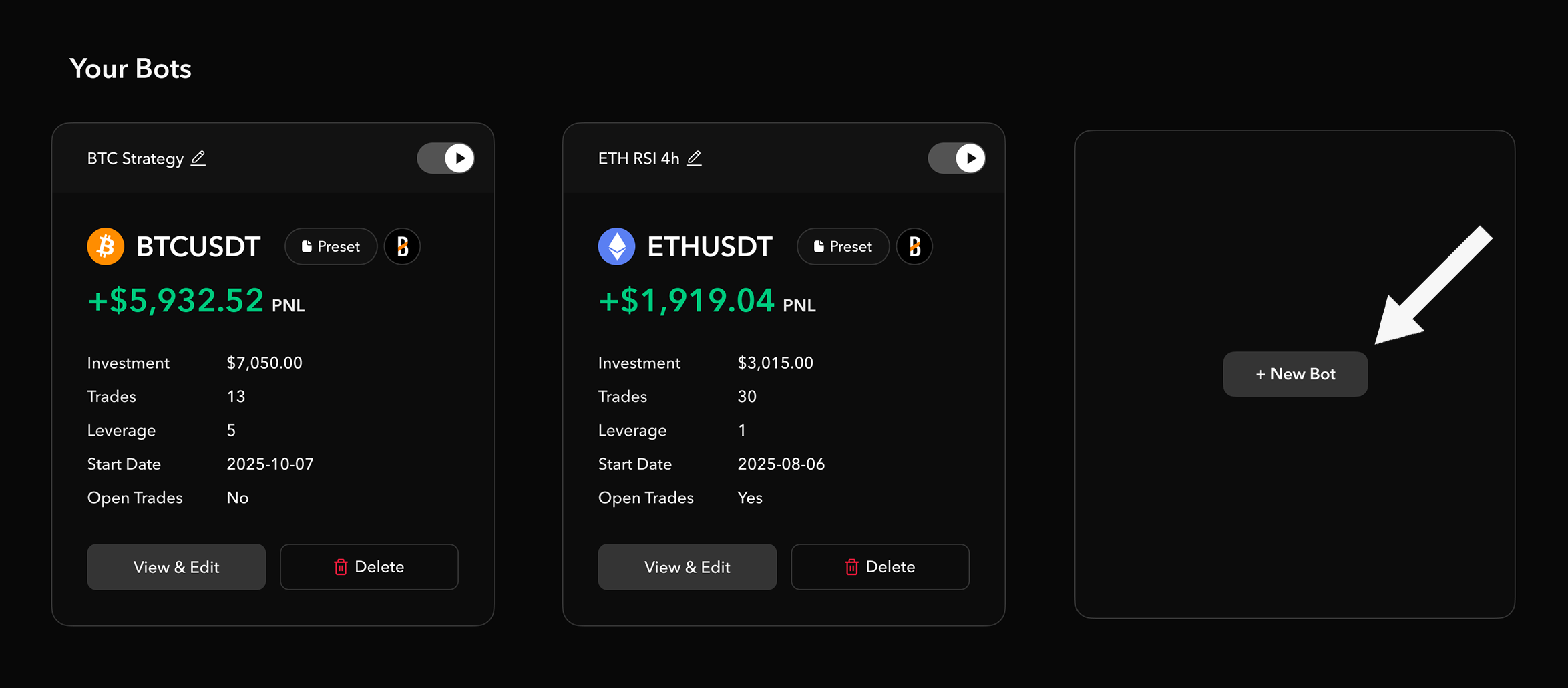
You can add new preset bots by clicking the `+ New Bot` tile under the bot manager section. This will launch the Algo Bot page where you can select a preset algorithm to follow. This allows you to quickly add a new trading bot to your arsenal so you can adapt to new market trends as quickly as possible.